Meetings
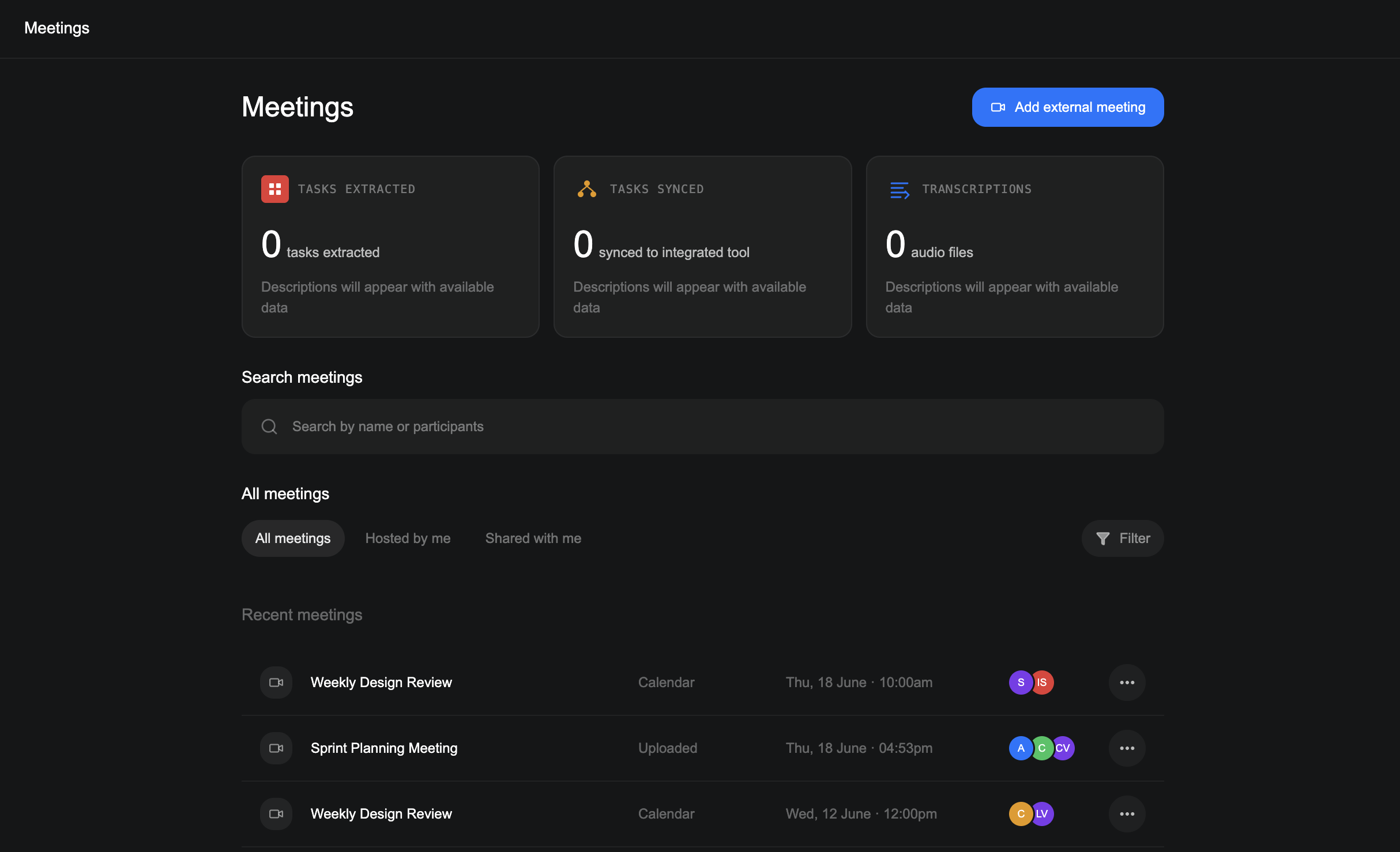
The Meetings page is where you add meetings, find the ones Verbels has processed, and open their summaries, transcripts, and tasks.
How to add a meeting
How you add a meeting depends on where it is and whether it has already happened.
Connect your calendar
The meeting is scheduled on your Google or Outlook calendar.
Add an external meeting
The meeting is not on your calendar, but you have a Zoom, Microsoft Teams, or Google Meet link.
Upload a transcript
The meeting has already happened and you have its transcript.
After Verbels processes the meeting, you will find it in your Meetings list.
Find the meeting you need
Use the search bar to find a meeting by its name or participants. You can also switch between:
- All meetings for every meeting available to you.
- Hosted by me for meetings you organized.
- Shared with me for meetings another person shared with you.
Use Filter when you only want to see calendar meetings, uploaded transcripts, or external joins.
Manage a meeting
Each row shows the meeting name, source, date and time, and participants. Open the options menu at the end of a row to:
- View meeting to open its summary, transcript, and tasks.
- Rename meeting to give it a clearer name.
- Copy meeting link to copy a link to the meeting.
- Delete to remove the meeting after confirming your choice.